For years, buying a game for the Steam Deck has involved a little bit of faith. You check the green Verified checkmark, skim a few user reviews, maybe hunt down a YouTube video of someone running it, and then hope the experience on your own handheld matches what you saw. This week Valve took a real swing at removing some of that guesswork: Steam store pages now show the average framerate actual players get on Steam Deck, complete with a histogram that shows how often a game dips and stutters.
It sounds like a small UI addition. I think it might be one of the more useful things Valve has added to the storefront in a while, with some caveats that are worth understanding before you treat that number as gospel.
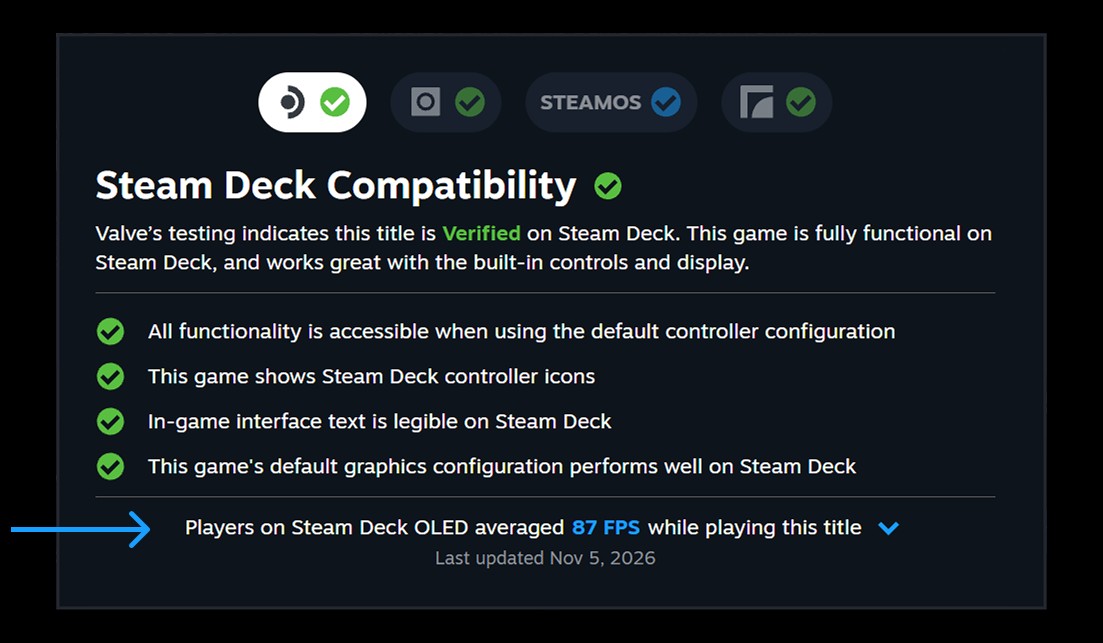
Valve announced the feature in a Steam News post on Nov. 9. The data comes from Deck owners who opted in to sharing anonymized framerate information, and Valve says a majority of Deck players have done so. It covers every game that has been through Deck compatibility testing, whether it landed on Verified, Playable or Unsupported, and Valve says “thousands” of games already have numbers attached. To find it, open a game’s store page, go to the Steam Deck Compatibility section and hit “Learn more.” Library pages show the same data, but only in the Steam Client Beta for now.
An average, plus the chart that keeps it honest
The headline figure reads something like “Players on Steam Deck OLED averaged 87 FPS while playing this title,” with separate tabs for the OLED and the original LCD model. That split matters, because the two run at different default frame limits: 90 FPS on the OLED and 60 FPS on the LCD. Valve says it only counts data from Decks left at that default cap, so somebody who manually locks a game to 40 FPS to stretch battery life isn’t dragging the average down.
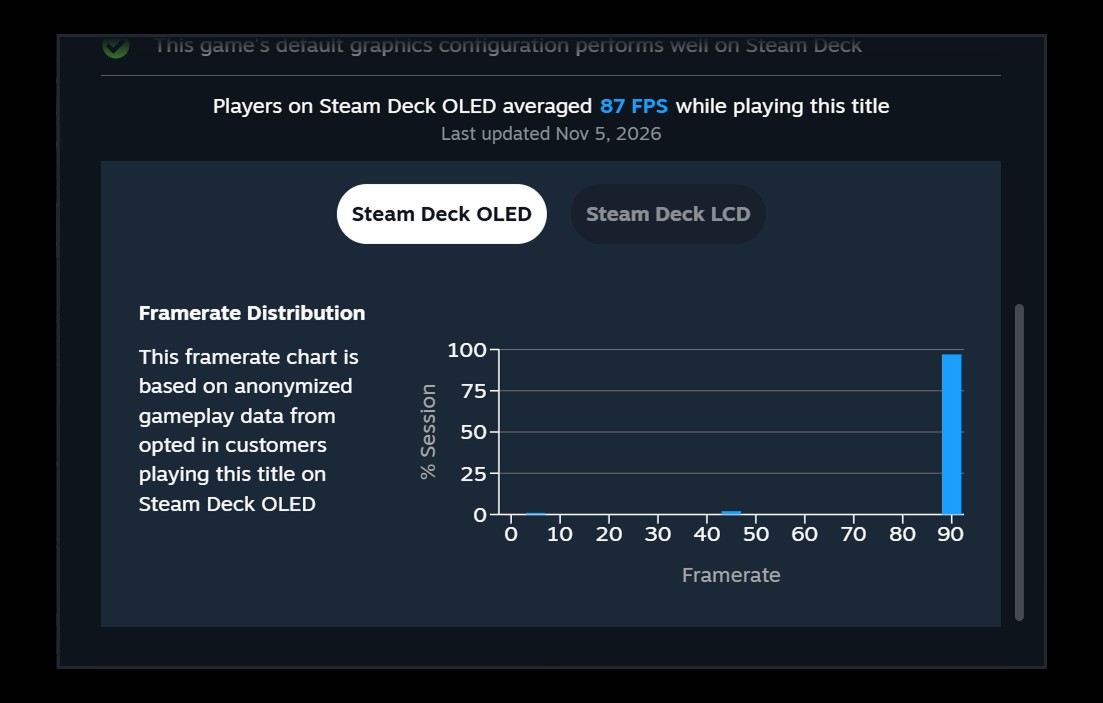
The more interesting part is the expandable framerate distribution chart. Instead of trusting a single number, you can see what percentage of sampled play time landed at each framerate. Valve’s own explanation is that hitches and stutters show up as small bars at the low end of the chart. A game sitting in one tall spike near the cap is going to feel very different from one smeared across the whole range, even if the two averages look similar.
Valve also uses its FAQ to explain one pattern that will confuse plenty of people: a big gap between 90 and 45 FPS on the OLED. That’s VSync at work. When a game can’t hold 90 FPS on a 90Hz screen, frames get presented at either 90 or 45 rather than tearing. Valve’s example is a sequence like 90, 90, 45, 90, 90, 45, which averages out to a respectable-sounding 75 FPS but alternates between frames held for roughly 11 and 22 milliseconds. On paper that’s smooth. In your hands it can feel uneven. The same thing happens when a game has its own internal 60 FPS limit on a Deck OLED set to 90.
That’s exactly why the histogram matters, and it’s also where the feature’s limits start showing. As heise online points out, Steam isn’t showing frame-time graphs or percentile figures like 1% lows, the stats PC hardware reviewers lean on to describe stutter. heise also notes that an earlier Valve note to developers said the framerate data includes loading screens, which can drag numbers down, and the public announcement doesn’t spell out whether the store figures do the same. Valve does say idle time and invalid samples are filtered out, and that it collects multiple samples per play session.
There’s another honest caveat: Valve doesn’t account for in-game graphics settings. Someone running a game on its lowest preset and someone cranking it up are both feeding the same average. Valve says that despite this, the data “consolidates around relatively narrow ranges,” which makes sense on a device where most people leave things alone. Smaller games also won’t get numbers right away, since Valve requires a minimum number of data points before it shows anything.
Why the Deck goes first, and what comes next
The reason this starts on the Deck is simple. Every Deck is the same machine, give or take the LCD and OLED differences, so an average actually means something. Valve says as much in its FAQ, calling the Deck a better starting point while it figures out which data and presentation are useful.
The bigger story is what Valve calls a “stepping stone.” The Steam desktop client is now prompting users on the Steam Client Beta to opt in to sharing anonymized framerate data too, and Valve says that prompt will reach everyone in the future. It hasn’t said how desktop numbers would be shown, and that’s the hard part. As Tom’s Hardware notes, it’s unclear whether PC data would be grouped by graphics card, by CPU and GPU combination, or something else. A single “average FPS” for a game across every gaming PC on Earth would be close to meaningless. Grouped by hardware, though, it could quietly become one of the best pre-purchase tools in PC gaming.
If you’d rather not contribute, the toggle lives under Steam account settings, in Data & Browsing, labeled Anonymous Game Framerate Data. Valve says you’ll also be prompted in your Steam Library.
The reaction from Linux and handheld players has been mostly positive. GamingOnLinux framed it as a fix for the “sometimes iffy” Verified badge, and Valve itself admits the badge “may not match every customer’s bar for acceptable gameplay.” That’s a refreshingly candid line. A Verified game can still land below the framerate some players want, and an Unsupported game can turn out perfectly playable for people who don’t mind a few rough edges.
It also lands during an awkward stretch for Steam on the developer side. Valve recently told developers on Steamworks that it’s “running a little behind” on pre-release build reviews, taking up to 12 business days instead of its usual three to five, with much of the delay coming from games that fail and have to be re-reviewed, as VGC and Game Developer reported. Its fixes include requiring developers to run a build through Steam for at least five minutes before submitting it. The backlog is still biting: GameSpot reports that Australia Did It: End-of-the-World Railway Defense Business, whose co-developer is Rami Ismail, missed its planned Nov. 10 launch while waiting on Steam’s review. Better data for buyers is great. Getting finished games onto the store on time is the more basic job, and right now it’s the one Valve is behind on.
Cody’s take
I grew up in the PS2 era, when the only performance info you got was the screenshots on the back of the box, and they were rarely honest. So seeing a store show real-world framerate from real players, with a chart that admits when a game stutters, is a genuinely good step. It’s the kind of transparency console storefronts have never offered.
Still, treat the number as a starting point, not a verdict. An average without frame-time data can hide exactly the hitches that make a game feel bad, and it doesn’t tell you what settings people used. Look at the histogram, not just the big blue number. If Valve can bring a hardware-aware version of this to desktop PCs without turning it into a misleading single score, that’s when this goes from handy to a real shift in how people shop for PC games. For now, Deck owners get a smarter way to decide what’s worth installing on the go.
Featured image: Photo: SparklesTrainNerd / Wikimedia Commons, CC BY-SA 4.0.
Author