CachyOS just did something I didn’t expect to see from an Arch-based distro this year: it shipped a ready-made boot path for Epic’s new Linux anti-cheat before there’s a single game that uses it. The CachyOS November 2026 release, out today (Sunday, Nov. 22), puts Easy Anti-Cheat Linux v2 support at the top of the notes. Right behind it are a rebuilt Package Installer that can now pull from the AUR, Flatpak and AppImages, and a new recovery environment that can roll back a broken system without a live USB.
That’s a lot for one ISO refresh, and most of it is good news. The anti-cheat piece needs the most context, though. Getting your PC ready is one thing. Actually playing Fortnite on Linux is another, and nobody is there yet.
What CachyOS built for EAC Linux v2
Quick refresher. In October, Epic announced EAC Linux v2, a rebuilt version of its Linux anti-cheat that it says will bring protection “much closer to par with Windows.” It doesn’t install a kernel driver. Instead, it leans on security features the Linux kernel already has and checks your machine every time you launch a protected game. The list is long: Secure Boot with a kernel signed by a “well-known” key, TPM 2.0 with measured boot, IOMMU enabled with passthrough off, kernel lockdown in integrity mode, kexec disabled and the BPF LSM active. A systemd service runs only while the game is open, and Epic plans to test all of this in Fortnite first.
That’s a tall order for a distro like CachyOS. Its whole appeal is tuned kernels and doing things your own way. So instead of changing its normal setup, the team added a separate lane. The new linux-cachyos-eac kernel is signed with a CachyOS key and comes with a matching signed systemd-boot. It gets its own boot entry, and your usual kernel and boot menu stay as they are. You boot into the EAC entry when you want to play a protected game, then reboot back to your normal setup afterward. Epic’s own FAQ says that kind of split setup is fine.
The CachyOS EAC wiki guide does most of the explaining. A new sudo eac-setup script checks your TPM, IOMMU and boot manager, then adds the CachyOS EAC certificate to your Secure Boot database next to your own keys and Microsoft’s. It also installs the EAC kernel and matching driver packages and creates the boot entry. eac-status checks the result, and sudo eac-setup boot reboots into the EAC entry one time. systemd-boot, Limine and rEFInd are supported. GRUB support is labeled experimental and doesn’t work with disk encryption yet. Limine, rEFInd and GRUB users keep their own boot manager as the default and start the EAC kernel through the CachyOS-signed systemd-boot.
Now the tradeoffs, because there are some real ones:
- No DKMS modules in the EAC boot. The EAC kernel only loads modules signed when it was built. CachyOS ships prebuilt packages for NVIDIA (
nvidia-openfor Turing and newer, the 580xx branch for Maxwell through Volta), ZFS and the Realtek r8125 network driver. Anything else you build with DKMS, like VirtualBox’s host modules or an out-of-tree Wi-Fi driver, won’t load there. - Your BitLocker or TPM-unlocked disk may ask for its recovery key. The setup changes your Secure Boot keys, and that changes what the TPM measures. The wiki tells you plainly to have your recovery key or passphrase ready before you start.
- Some firmware work is on you. TPM 2.0 (firmware TPMs like Intel PTT or AMD fTPM count) and IOMMU have to be turned on in your BIOS, and depending on your setup you may need to put the firmware into Secure Boot Setup Mode.
Then there’s the big asterisk. As of today, no game is using EAC Linux v2. Epic told The Verge in October that it had no timeline for Fortnite on Linux, and nothing has launched since. Epic’s published list of well-known keys, which I checked today, names Canonical, Fedora, Universal Blue, Debian, openSUSE, SUSE, Rocky Linux, AlmaLinux and the Microsoft UEFI CA. CachyOS isn’t on it. CachyOS’s release notes say the EAC kernel is signed with “a key that Epic trusts,” and lead developer Peter Jung wrote in the original kernel pull request that Epic has been “very collaborative.” Even so, a clean eac-status result tells you your machine meets the checklist. It doesn’t promise Fortnite will launch on day one. Epic does say you won’t get banned for trying a protected game on a setup that doesn’t qualify. You’ll just get an error message.
Not everyone is cheering, either. In that same pull request, sbctl author Foxboron asked how CachyOS would revoke vulnerable boot binaries. Jung answered that there’s “no plan for this yet for the short term” and said a proper shim review is the long-term goal. Foxboron called the approach “security theater.” That’s a fair concern, and it’s worth keeping in mind if you care about Secure Boot for more than games.
Package Installer 2.0 and a real undo button
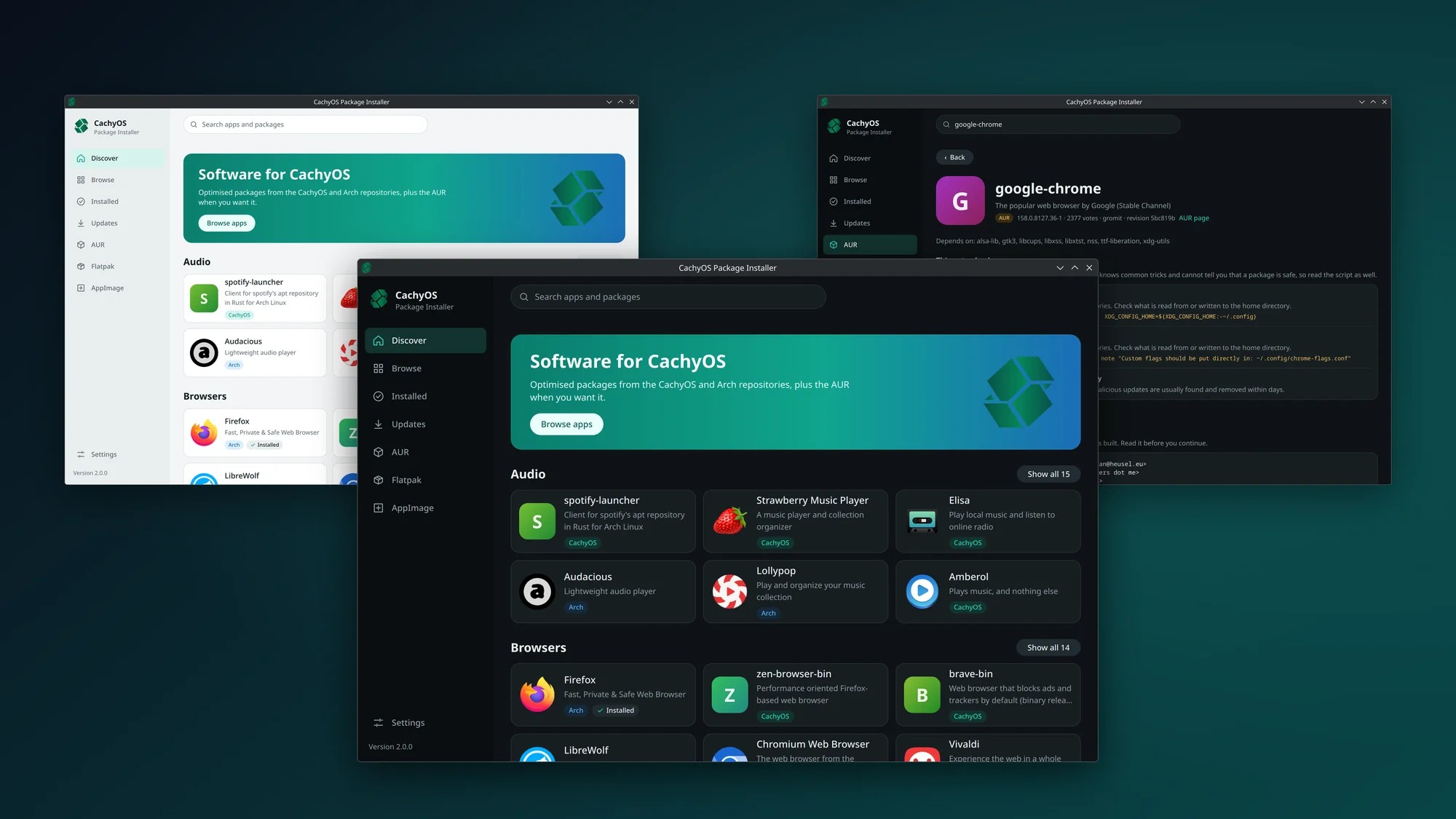
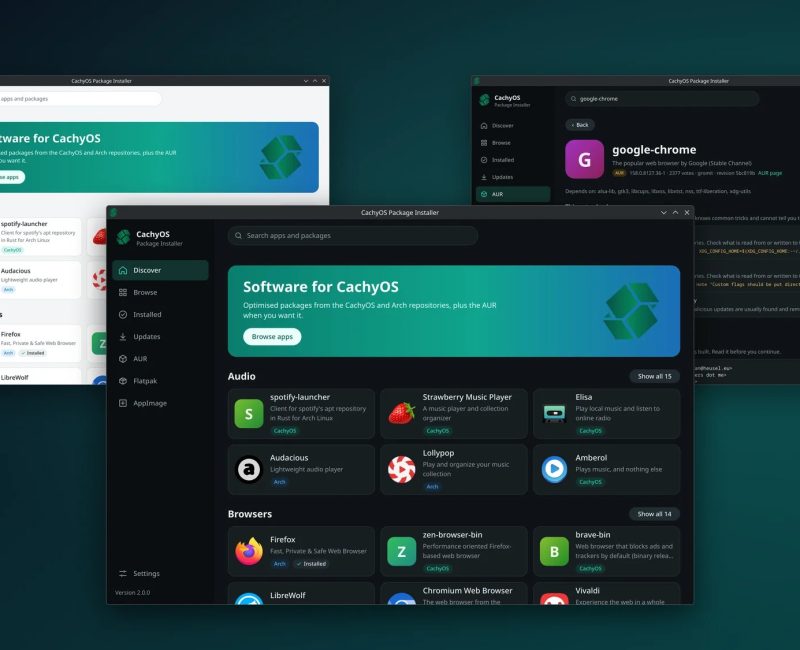
If anti-cheat isn’t your thing, the rest of this release might be the better reason to update. The CachyOS Package Installer hits 2.0.0 with a full redesign, and it now covers the AUR, Flatpak and AppImages. Each one is opt-in. The AUR part is the smart bit. Before anything gets built, the app shows you the PKGBUILD and install scripts and runs a static analysis that highlights lines worth a closer look. When an AUR package updates, it shows what changed since the version you have installed. That won’t catch every malicious package, but it nudges people to actually read what they’re running, and that’s a good habit to build.
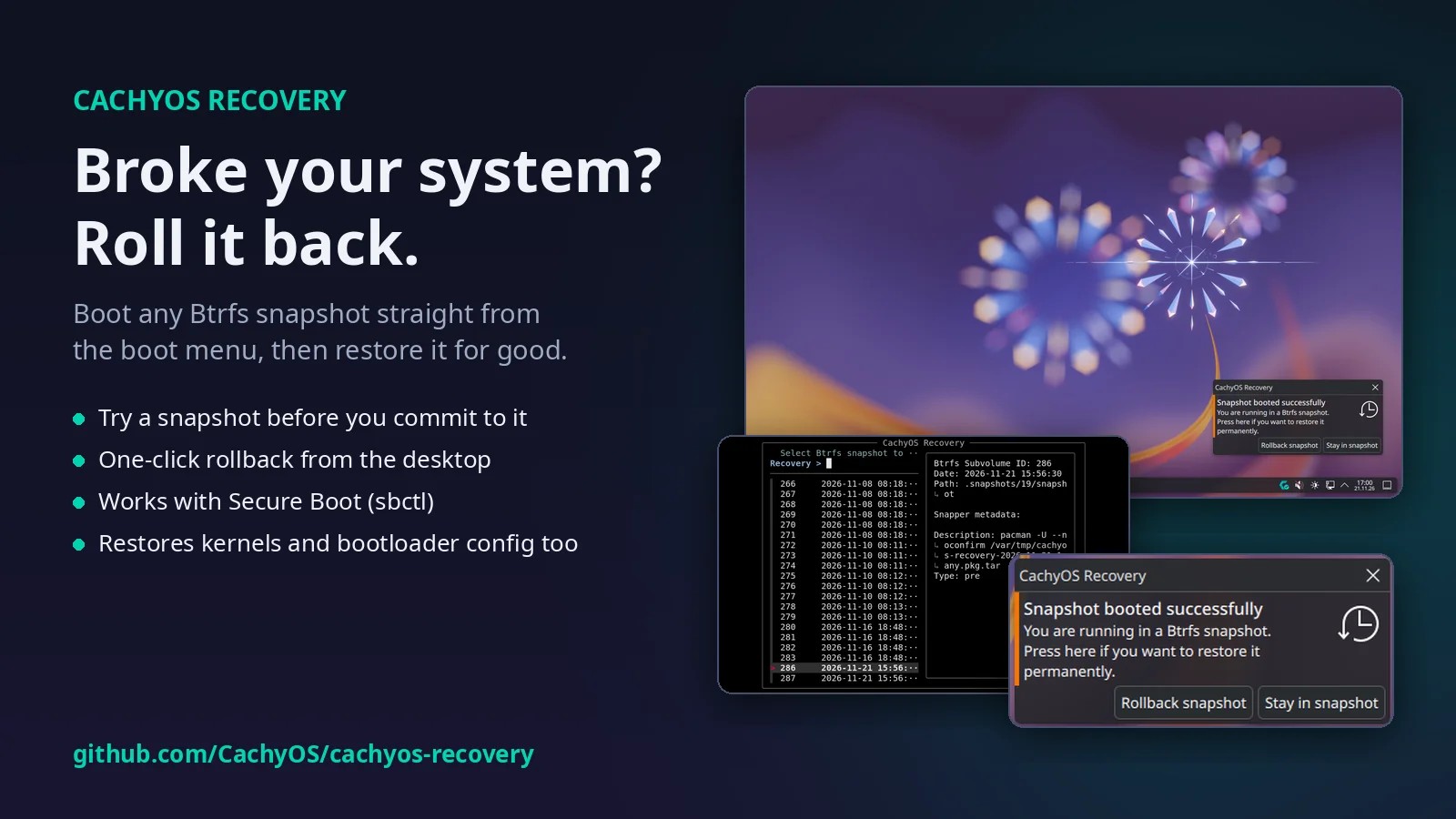
cachyos-recovery is the other headline. It’s a self-contained recovery image you can launch from your boot menu or straight from UEFI. From there you can boot any Btrfs snapshot with a writable root to try it first, then make the rollback permanent from the recovery menu or a desktop notification. CachyOS says it regenerates the kernel, initramfs and bootloader config for the restored snapshot, works without Snapper, supports LUKS encryption and takes about 70MB on the EFI partition. For a rolling-release distro, an easy undo button matters a lot. Install it with sudo pacman -S cachyos-recovery, or cachyos-recovery-legacy on BIOS systems.
Under the hood, the release ships Linux 7.3.5 (plus the 6.18.64 LTS kernel), NVIDIA 620.73.04, Mesa 26.3.1 and proton-cachyos 11.0-20261015. A new cachyos-drm-awaiter package replaces early KMS and the old NVIDIA module loader. It waits for any GPU driver to load before the login screen starts and shows a QR code if the driver fails. There’s also an official WSL image now, systemd-oomd is back on by default, and handheld game mode picks up a steamosctl change. Existing users get one manual step: after sudo pacman -Syu, run sudo chwd -a -f to reinstall your driver profiles for the new GPU loader. Fresh ISOs are on the release page and SourceForge.
Cody’s take
I grew up when “anti-cheat” meant a memory card and an honor system on the couch, so I get why plenty of Linux players see EAC v2 as a step backward. I also get why Epic won’t ship Fortnite to an open platform without some way to trust the machine. CachyOS found a decent middle ground. The locked-down kernel is opt-in, it lives in its own boot entry, and your normal system stays yours. That’s a better deal than giving up on Linux to play a few multiplayer games.
Still, don’t set this up today expecting to drop into a match tonight. There’s no EAC v2 game yet, CachyOS isn’t on Epic’s public key list, and if you rely on DKMS drivers or TPM disk unlock, you have some homework first. If you’re on CachyOS anyway, update for the recovery tool and the new Package Installer. Hold off on the EAC setup until Epic actually flips the switch on a game you want to play.
Author