



Every few weeks somebody promises a “frontier” AI model that runs on your own computer, and every few weeks the fine print turns out to be doing a lot of heavy lifting. Edge0’s new Edge0-145B is the most interesting version of that pitch I’ve seen in a while, because this time the weights are actually public, the inference engine is on GitHub, and you can check the claims yourself. Some of them hold up. Some of them need an asterisk the size of a GPU.
Edge0, whose launch post lists an AutoArk contact address for integrations, published the 145B model and a smaller Edge0-120B on Hugging Face on Nov. 11 and wrote them up in a long launch post on Nov. 12. The headline claim is bold: “the world’s first open-source on-device AI model with 145 billion parameters,” running on “a compatible laptop” at a reported 29GB of peak memory and more than 80 tokens per second. The launch also landed near the top of Hacker News, where the discussion thread passed 350 points and 100 comments, much of it arguing about exactly what that 29GB number means.

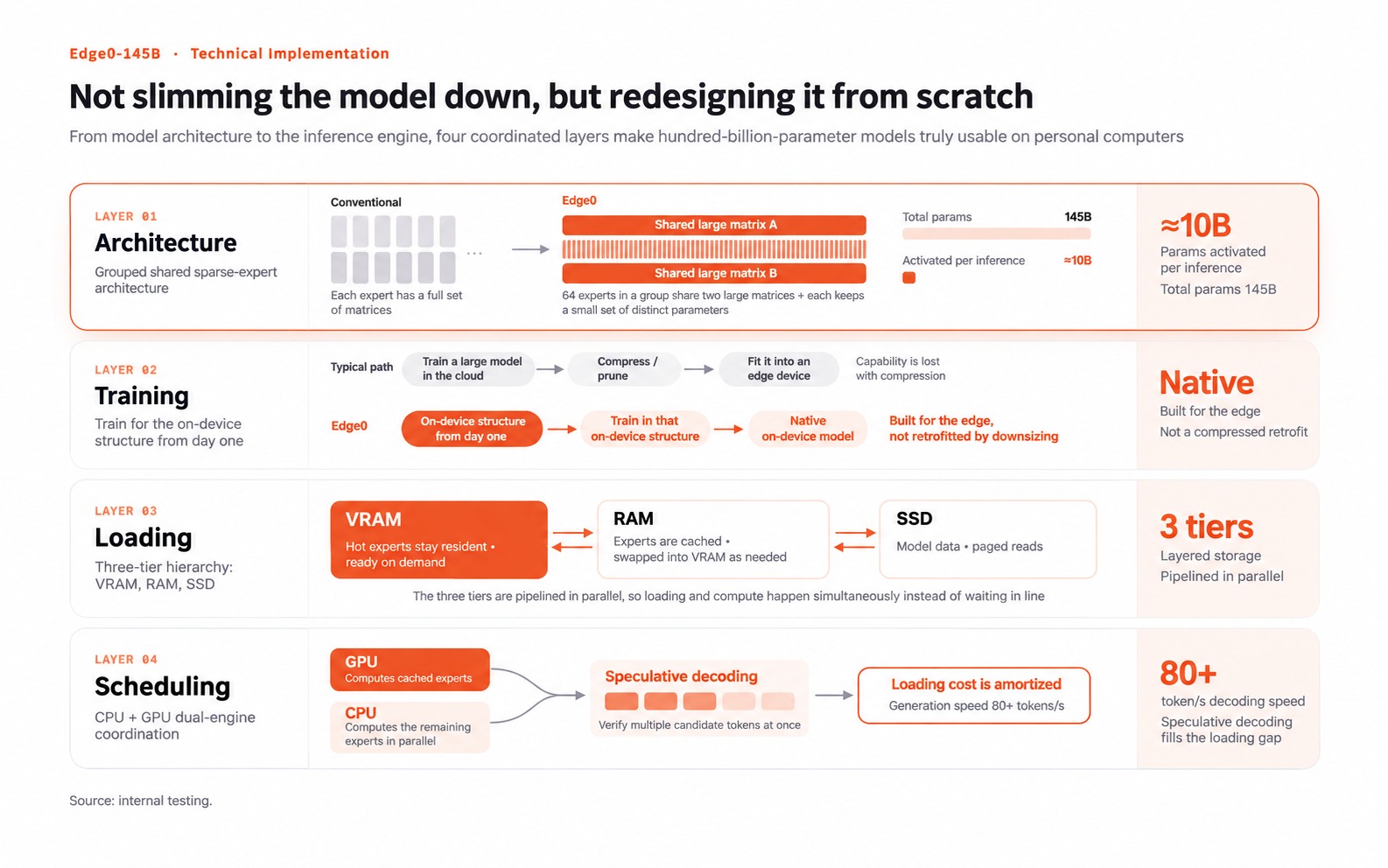
How a 145B model squeezes onto one GPU
The trick is a heavily sparse mixture-of-experts design. According to the official model card, Edge0-145B has 48 layers with 512 experts each, but only 10 routed experts plus one shared expert fire for any given token. That works out to about 10.12 billion active parameters per token out of 145 billion total, with a 256K-token context window.
What makes it different from a straight quantization is what Edge0 calls a “latent MoE.” Instead of every expert running at the model’s full 2,560-wide hidden size, each token is projected down to a narrow latent width (1,792 on the 145B, 1,280 on the 120B), the experts do their work there, and the result is projected back up. The company says it built this on top of Alibaba’s Qwen3.8-Flash-Next, replaced the routed experts in all 48 layers, then post-trained the rebuilt model natively at 4 bits rather than compressing it after the fact. The payoff is that each expert becomes a small fixed-size chunk, about 1.63MB on the 145B, which the engine can shuffle between VRAM, system RAM and SSD.
That shuffling is the real engineering story here. The launch post describes a three-tier setup: frequently used “hot” experts live in GPU memory, an expert library of roughly 40GB sits in system RAM, and a huge n-gram embedding table (51.2 billion parameters in FP8, per the model card) stays on the SSD and gets read on demand. The CPU and GPU split the work, and speculative decoding with a small draft head spreads the cost of every weight read across more output tokens. The engine itself, edge0-strata, is a fork of the open-source Strata project, and it ships alongside an Apache 2.0 inference framework with OpenAI- and Anthropic-compatible local endpoints plus an Edge0 Chat desktop app for Windows and macOS.
Honestly, this is the kind of systems work I love seeing in local AI. Most people running models at home hit the memory wall long before they run out of compute, and designing the architecture around that limit instead of shrinking a cloud model until it fits is a smart direction.
The fine print on “runs on a laptop”
Here’s where it gets complicated. The launch post says the model runs on “a compatible personal laptop, such as a MacBook Pro,” with 29GB peak memory, 80+ tokens per second decode and around 120W typical power. But it never names the exact laptop, chip or memory configuration behind those numbers, and the company’s own documentation tells a different story.
The Edge0 145B reference doc lists requirements of an NVIDIA GPU with CUDA 13 and at least 16GiB of VRAM plus 20GiB of system memory on Linux or Windows, or Apple Silicon with Metal on macOS. The macOS measurements, it says, were taken on an Apple M2 Ultra, which is a desktop chip found in the Mac Studio and Mac Pro, not a MacBook. The full speed table on the model card is mostly desktop hardware too: an RTX 5090 D 24GB hits 121.2 tokens per second in agent decoding with the Q3_K build, an RTX 4090 manages 91.7, and the M2 Ultra comes in at 57.0.
The “16GiB VRAM + 20GiB RAM” row that looks like a modest-PC result is the same RTX 5090 D with its VRAM and RAM artificially capped, and it drops to 44.9 tokens per second in agent decode and 335 tokens per second of 16K prefill. That’s still very usable, but it’s a long way from the 80+ figure in the headline. The card even notes that with expert residency turned on, the Q3_K build occupies about 23GiB of VRAM plus 31GiB of RAM on that card.

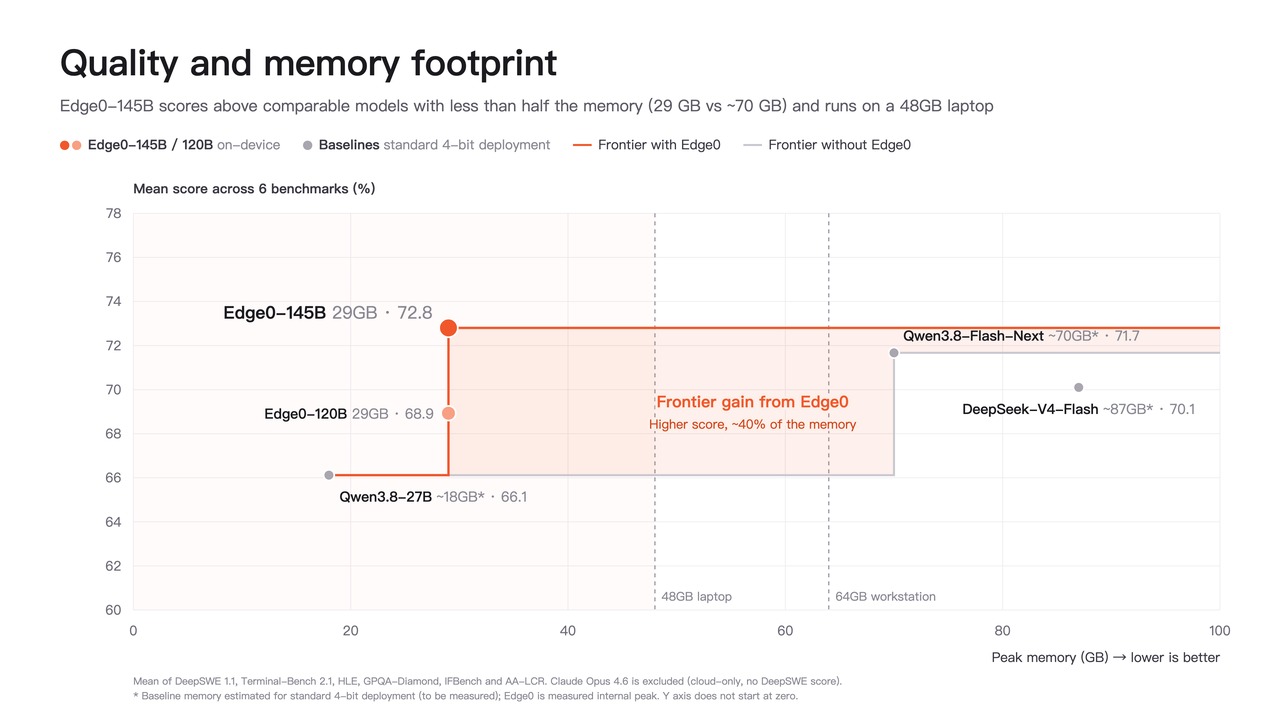
Then there’s the download. “29GB” describes peak memory during inference, not the size of the model. When I added up the files in the Hugging Face repositories today, the Q3_K build came to about 106GB and the NVFP4 build to about 114GB, because that giant embedding table and the full expert pack have to live somewhere, and that somewhere is your SSD. The files also aren’t ordinary GGUF or safetensors checkpoints; they’re a custom pack that only Edge0’s own engine runs. Hugging Face’s own parameter counter reads just the skeleton file, which is why the site shows a number far below 145B. The independent site Traictory, which dug into the repositories on Nov. 14, reached the same conclusion: the weights are real, but the laptop in the spec table is “a sentence, not a machine.”
The benchmarks deserve the same caution. Edge0 reports 64.6 on DeepSWE 1.1, 86.52 on Terminal-Bench 2.1, 90.4 on GPQA-Diamond and 80.6 on IFBench, and compares those against Qwen3.8-Flash-Next, DeepSeek-V4-Flash and Claude Opus 4.6. Those are strong numbers, but the post states plainly that the Edge0, Qwen, DeepSeek and Claude results all come from Edge0’s internal evaluations, and the full setup is promised in a technical report that isn’t out yet. By the company’s own table, the base Qwen3.8-Flash-Next still edges out Edge0-145B on HLE and GPQA-Diamond. In other words, the rebuilt model looks roughly on par with its parent while needing far less memory, which is impressive on its own without the “rivals frontier cloud models” framing.
Finally, the word “open-source.” The inference framework is Apache 2.0, but the model weights use the custom Edge0 Community Model License 1.0, layered on top of Qwen’s own community license. It allows personal use, research, modification, non-commercial sharing and commercial use of the outputs, but selling or bundling the model, running a paid model service, or shipping a commercial coding or office assistant built on it requires a separate written license. That’s open weights, not open source in the OSI sense, and if you’re thinking about building a product on it, that distinction matters.
Cody’s take
I’m genuinely excited about what Edge0 is doing, even with all those caveats. A 145B-class model that Edge0 clocks at over 90 tokens per second of agent decoding on an RTX 4090, and stays usable when squeezed into 16GB of VRAM, is a real step forward for people who want capable local AI without renting cloud GPUs. The latent-MoE approach and the SSD-streaming engine are worth watching even if this exact model isn’t the one you end up using.
What I’d like to see next is simple: name the laptop, publish the technical report, and let independent testers reproduce those benchmark numbers. Until then, treat “runs on a laptop” as “runs on a very well-equipped machine with a fast SSD and about 106GB of free space,” and you’ll set your expectations right. If you’ve got a beefy NVIDIA card and the disk space, the Edge0 Chat app is the easiest way to try it on Windows. Just know that, for now, it runs on Edge0’s own engine rather than dropping into the llama.cpp, Ollama or LM Studio setups most of us already use.

