


Halloween weekend is supposed to be about scares, but AMD spent the last few days of October doing the opposite for Radeon owners. In the span of about 72 hours, the company pushed out a developer kit that finally brings its machine-learning upscaler to Vulkan games, then followed it with an optional driver aimed squarely at the crashes and timeouts people have been grumbling about all month. Neither release is flashy on its own. Put them together, though, and you get a pretty clear picture of where Radeon gaming is headed going into the holidays.
Here’s what landed, what it means for the card already sitting in your PC, and what’s still broken.
FSR SDK 2.4: Vulkan finally gets the good stuff
On October 28, AMD’s developer team published FSR “Redstone” SDK 2.4 on GPUOpen. The headline change is Vulkan support that AMD describes as being at feature parity with DirectX 12 for both upscaling and frame generation. The only carve-out AMD lists is Intel PresentMon reporting, which still stays on the DirectX 12 side.
If you’ve followed FSR 4 since it debuted on the RX 9000 series in 2025, you know the ML-based version of the upscaler has lived almost entirely in DirectX 12 land. That left a big chunk of PC gaming out in the cold, including plenty of games built on Vulkan and, by extension, a lot of the Linux gaming scene that leans on Vulkan through translation layers. SDK 2.4 changes the starting point for developers. According to the FSR SDK page, the package now ships:
- FSR Upscaling 4.1.2
- FSR Frame Generation 4.0.2
- FSR Frame Generation (Swapchain) 4.0.0, a new piece in this release
- FSR Ray Regeneration 1.2.1, the ML denoiser for ray-traced scenes
- FSR Radiance Caching 0.9.0 as a technical preview
There’s an important catch, and AMD is upfront about it. Existing Vulkan games that already use FidelityFX Super Resolution 3.1 won’t get quietly upgraded to the ML upscaler through the driver. That driver-level upgrade trick only applies to DirectX 12 titles. For Vulkan, a studio has to integrate SDK 2.4 itself. The upside is that once a Vulkan game ships with FSR Upscaling 4.1.2, Frame Generation 4.0.2 or the new swapchain frame generation, AMD says it becomes eligible for automatic upgrades to future versions through Adrenalin drivers. So the first integration is the hard part, and after that the tech can keep improving without a game patch.
Ray Regeneration and Radiance Caching stay DirectX 12 only in this release, and AMD’s samples target Vulkan 1.2.

Your RX 6000 card just got a second wind
The part of this story I keep coming back to is the RDNA 2 angle. AMD’s October 20 newsroom post confirmed that FSR Upscaling 4.1 now runs on Radeon RX 6000 series cards, which first launched back in 2020. AMD says it got there by optimizing the INT8 model it originally built for the RX 7000 series so it would fit the older architecture. SDK 2.4 is the developer-side follow-through, putting ML upscaling on RX 9000, 7000 and 6000 discrete GPUs through a single integration.
That same expansion reaches beyond desktop cards. AMD lists Ryzen AI Max processors, laptops built on Ryzen AI 9 chips, and handhelds using the Ryzen AI Z2 Extreme, Ryzen Z2 Extreme and Ryzen Z2 A. According to GPUOpen, the Ryzen AI Max chips run the full ML model, while a new lighter model was built for more constrained integrated graphics in thin laptops and handhelds. AMD also says Xbox Series X|S consoles are getting FSR Upscaling 4.1 “coming soon,” with Xbox CTO Scott Van Vliet confirming it in AMD’s announcement video.
As someone who grew up squinting at PS2 games on a CRT, I still think the idea that a five-year-old graphics card can pick up a smarter, AI-driven upscaler through software is wild. That’s real value showing up for people who never spent another dime.
Frame generation gets smoother pacing on RX 9000
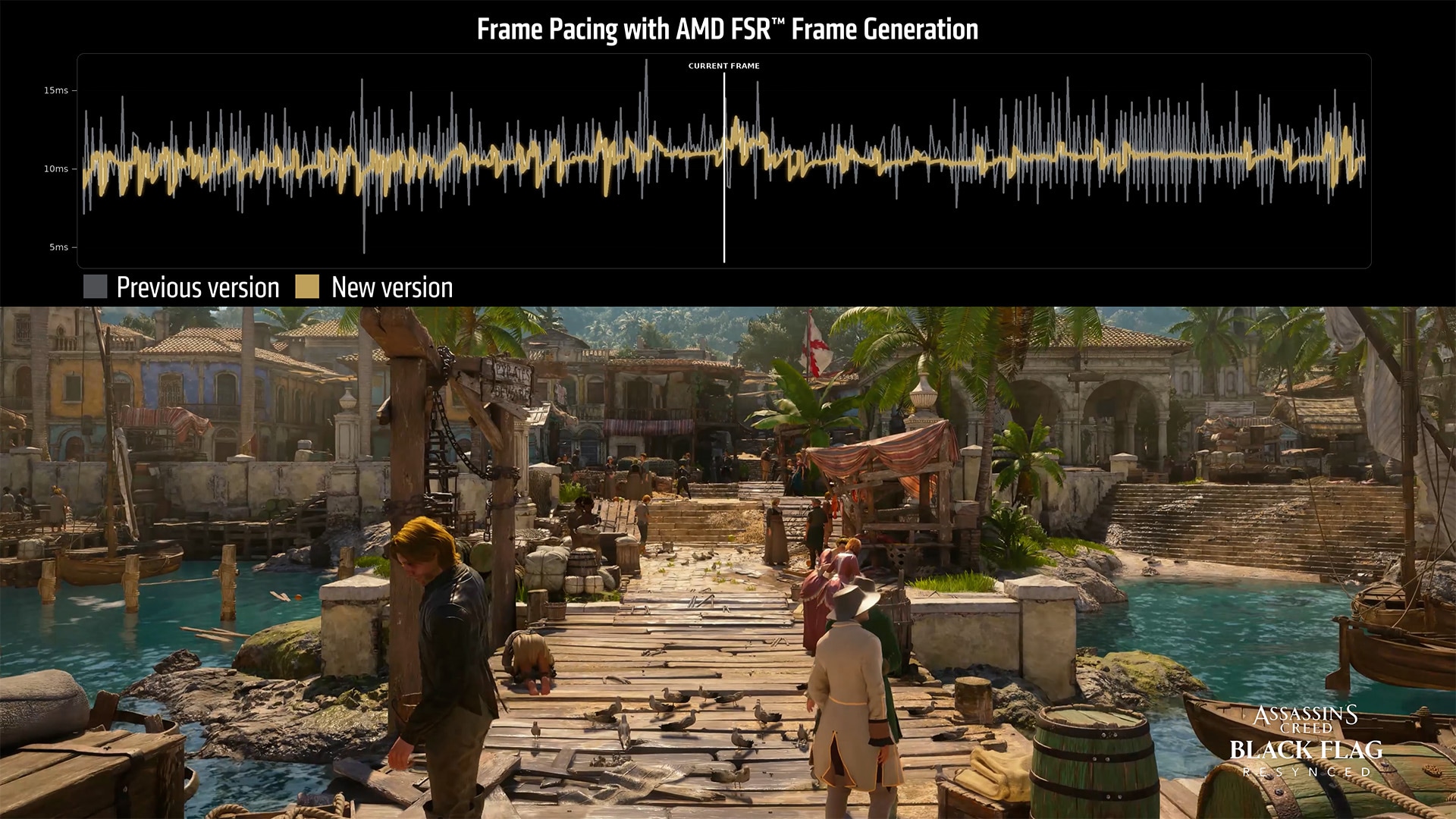
RDNA 4 owners get their own treat. SDK 2.4 adds Driver-Assisted Frame Pacing for FSR Frame Generation on the RX 9000 series, on both DirectX 12 and Vulkan. Per AMD’s “What’s new” notes, it needs an RX 9000 series GPU or newer plus Adrenalin 26.10.1 or later. Frame pacing is one of those things you don’t notice when it’s right and absolutely notice when it’s wrong, so any work here is welcome. Generated frames that arrive unevenly can make a high FPS counter feel worse than a lower, steadier one.
The new swapchain-based frame generation is RDNA 4 only, too. On other hardware, AMD says the API automatically falls back to the older FidelityFX Super Resolution frame generation swapchain, version 3.1.7.
Adrenalin 26.10.2: a cleanup driver, and a needed one
Two days after the SDK, on October 30, AMD posted Adrenalin Edition 26.10.2 as an optional driver. No new game support, no new features. Just fixes, and there are ten of them. The ones most people will feel:
- Opening or closing other overlays, like Xbox Game Bar, while AMD’s Performance Metrics Overlay is running could crash games or time out the driver. Fixed.
- The Steam launcher could crash on Radeon graphics. Fixed.
- RX 7000 cards could hit driver timeouts during video playback on Windows 11 with Hardware-Accelerated GPU Scheduling turned on. Fixed.
- RX 9000 systems could crash or hang when switching apps or toggling overlays with in-game FSR Frame Generation enabled. Fixed.
- Game-specific fixes for Valor Mortis on RX 7000 and RX 7600 series cards, Final Fantasy Resonance on Ryzen AI Max PRO 400 processors, and Death Stranding 2: On the Beach with FSR on RX 9000 cards.
One oddity worth flagging: the Death Stranding 2 hang shows up under fixed issues, but the note still tells affected users to disable FSR. If you’re still seeing hangs in that game, that’s your fallback. AMD also fixed an AMD Install Manager bug where it couldn’t find optional drivers when “Recommended + Optional” was selected, which is a little ironic for an optional driver.
What’s still on the known issues list
This isn’t a clean bill of health, and it’s fair to say so. AMD’s own notes still list problems including:
- Crashes or driver timeouts in Assassin’s Creed Black Flag Resynced on RX 7000 cards.
- A Cyberpunk 2077 crash on some RX 9000 cards when FSR Upscaling, Radeon Anti-Lag and in-game frame generation are all on while a video plays on a second monitor. AMD’s workaround is to turn off in-game frame generation.
- Sky and character hair corruption in Phantom Blade Zero on RX 9000 cards. Disabling the High-Quality Hair setting helps with the hair.
- Driver timeouts in War Thunder on RX 5000 cards, with AMD recommending a step back to Adrenalin 26.9.1.
- A black screen launching Gears of War: Reloaded on Ryzen AI 9 400 processors, and issues in Call of Duty: Modern Warfare Remastered on RX 9000 and Ryzen AI Max PRO 400.
- Smart Access Memory possibly turning itself off after a driver install on Windows 10.
If you’re downgrading for any reason, AMD recommends running the AMD Cleanup Utility first.
Cody’s take: should you install it?
If you’ve been hitting any of the fixed bugs, especially the overlay crashes, the Steam launcher crash or the HAGS video timeouts on an RX 7000 card, 26.10.2 looks like a no-brainer. If your system is stable right now and you mostly play one of the games on the known issues list, it’s reasonable to read the notes first and decide. That’s the whole point of an optional driver.
The bigger story is the SDK, even if you won’t feel it today. Vulkan parity is the piece that was missing for ML upscaling to feel like an ecosystem feature instead of a DirectX 12 perk. It won’t light up overnight, because developers have to integrate it, but the door is open now. Combine that with RX 6000 support, handhelds and an Xbox rollout on the way, and FSR 4.1 suddenly covers a lot more hardware than it did a month ago.
I’ll be watching for the first Vulkan games to ship with FSR Upscaling 4.1.2, and I’m especially curious how it plays out for Linux gamers once those titles start arriving. When that happens, you’ll hear about it here.

